


Lucidly · for practitioners

See how your clients are doing between sessions.

Clients who use Lucidly can share their check-ins, doses, protocol and journal with you. They choose what you see, and you read it in your browser before you meet.

Free for practitioners · Works in any browser

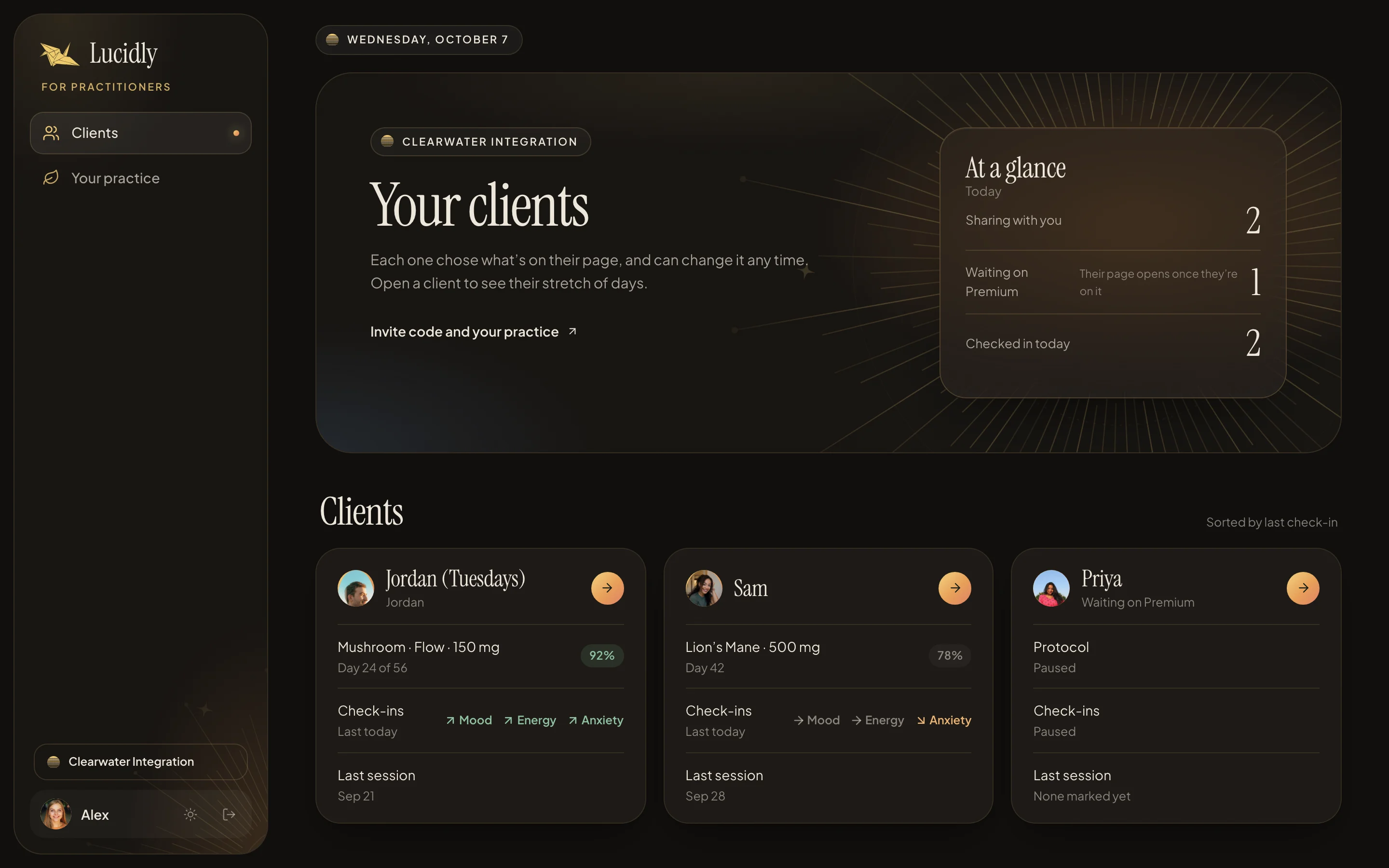
A practitioner's client list at lucidly.you/practice in dark mode: three clients, each with their photo, their protocol and dose, adherence, whether mood, energy and anxiety are rising or falling against their baseline, and their last session
  • JordanCheck-ins, doses, protocol, journal entries and notes
  • SamCheck-ins, doses, protocol and Cycle & Mood
  • PriyaJust linked · their page opens once they’re on Premium
  • Integration coaches
  • Microdosing coaches
  • Therapists
  • Retreat aftercare
  • Licensed facilitators in Oregon & Colorado
  • Guides working one to one
How it works

Three steps, and your client leads.

You only bring the clients you already work with. Lucidly doesn't connect people with practitioners, and nothing is shared until a client says yes.

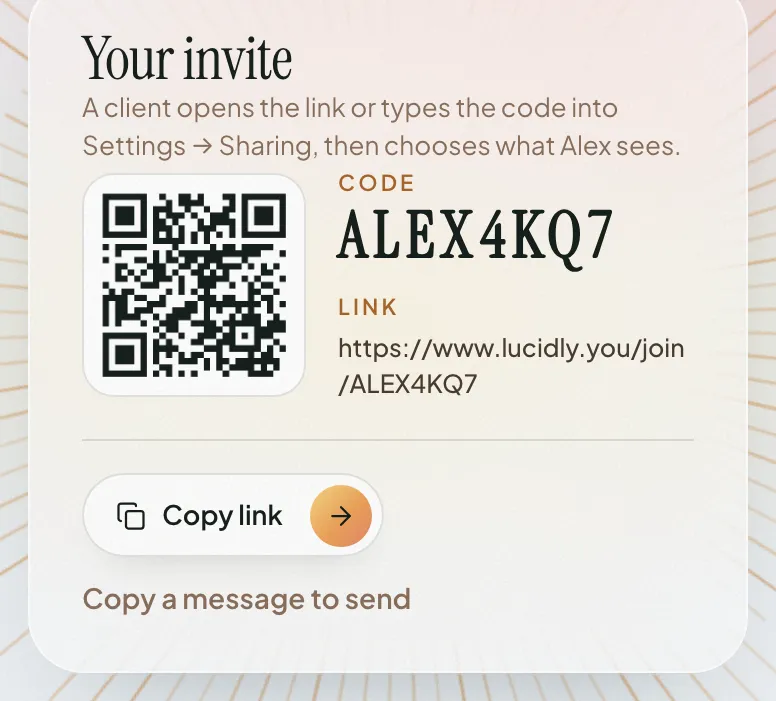
  1. A practice's invite at lucidly.you: a QR code, the invite code ALEX4KQ7, the link lucidly.you/join/ALEX4KQ7, a Copy link button and Copy a message to send
    01

    Open your practice

    Sign in at lucidly.you/practice with your email (a code arrives, no password) and name your practice. You get a link, a QR code and a short code to send your clients.

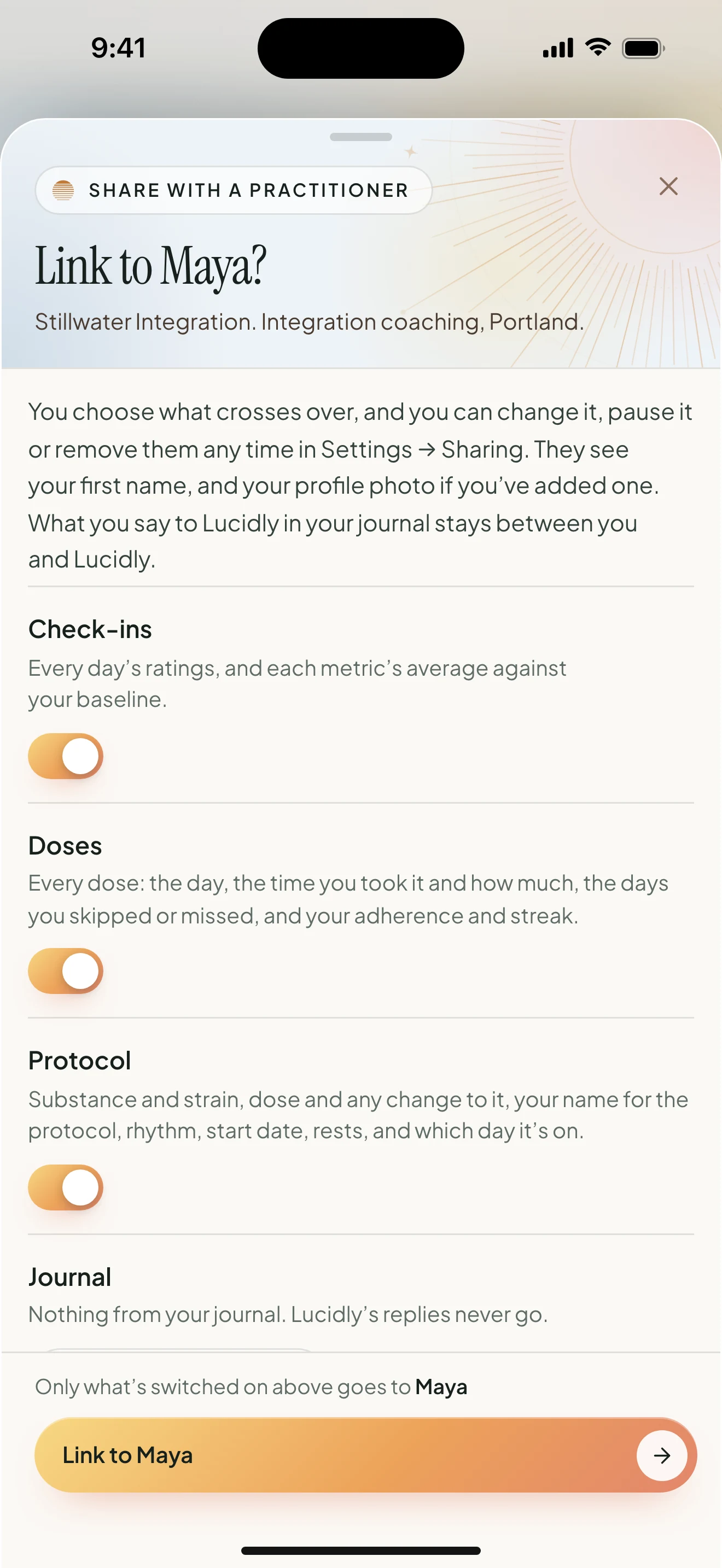
  2. In the Lucidly app, a client opening a practitioner's invite: Link to Maya?, with a switch for each thing they can share, check-ins, doses and protocol on, journal off
    02

    They choose what you see

    Your client opens the link, or types your code into Settings → Sharing in the Lucidly app, and sets a switch for each kind of information. They can change it, pause it or stop it any time.

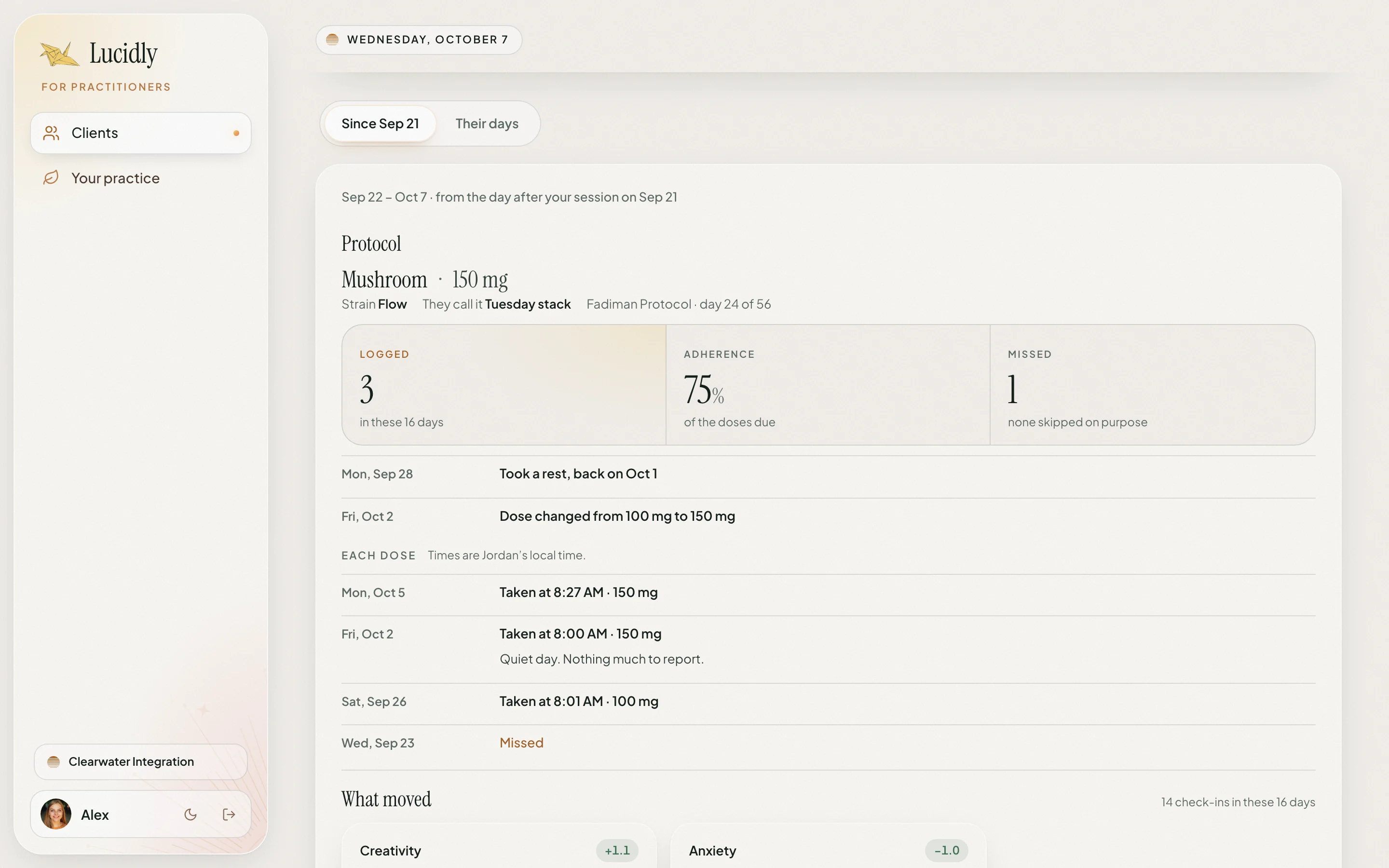
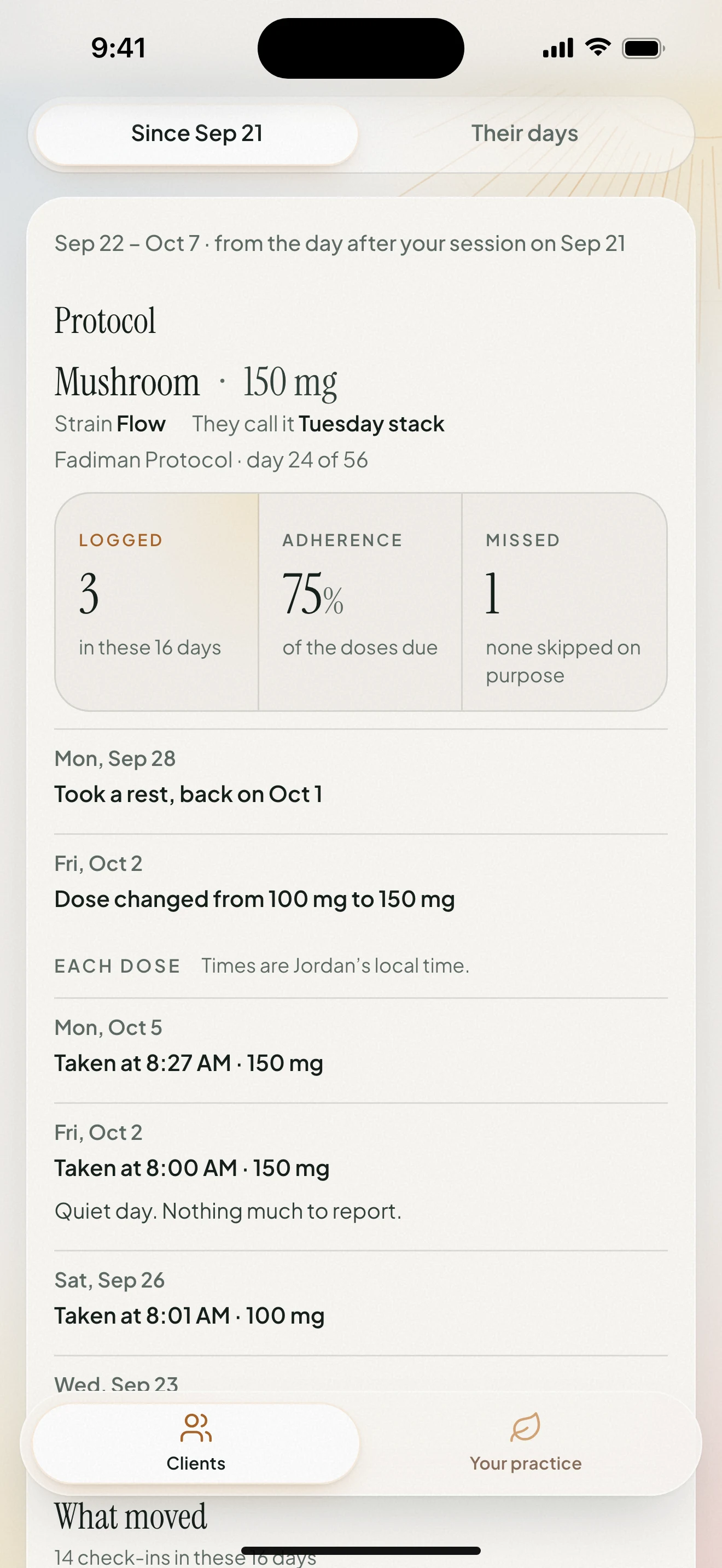
  3. A practitioner's page for a client on a phone: Since Sep 21, with the protocol, 75% adherence, a rest, a dose change from 100 mg to 150 mg and each dose taken
    03

    Read it before you meet

    Open their page on your computer or your phone and see how things have gone since your last session, in a few minutes, without asking them to remember.

What clients can share

Everything they can show you.

Six switches, all in your client's hands. Here is exactly what each one puts on your page, shown from a real client page in Lucidly.

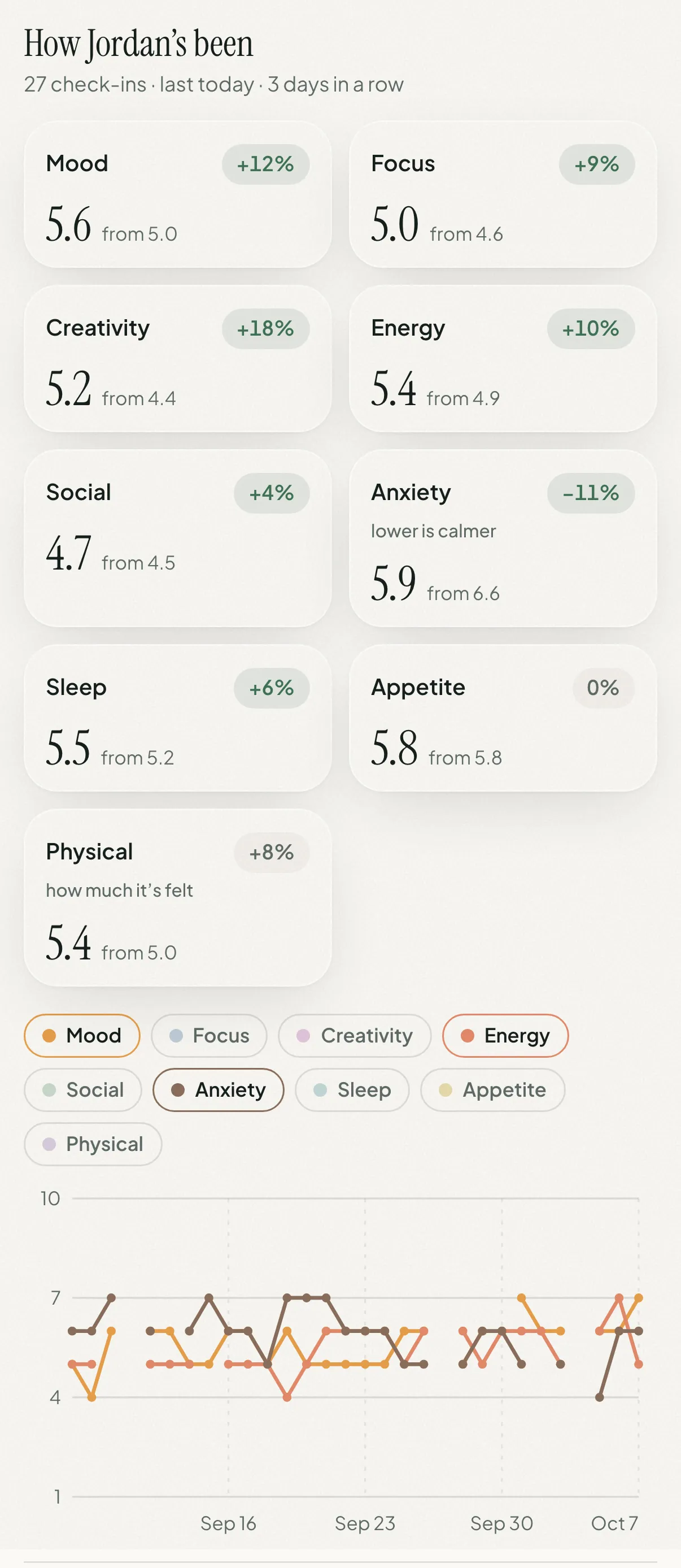
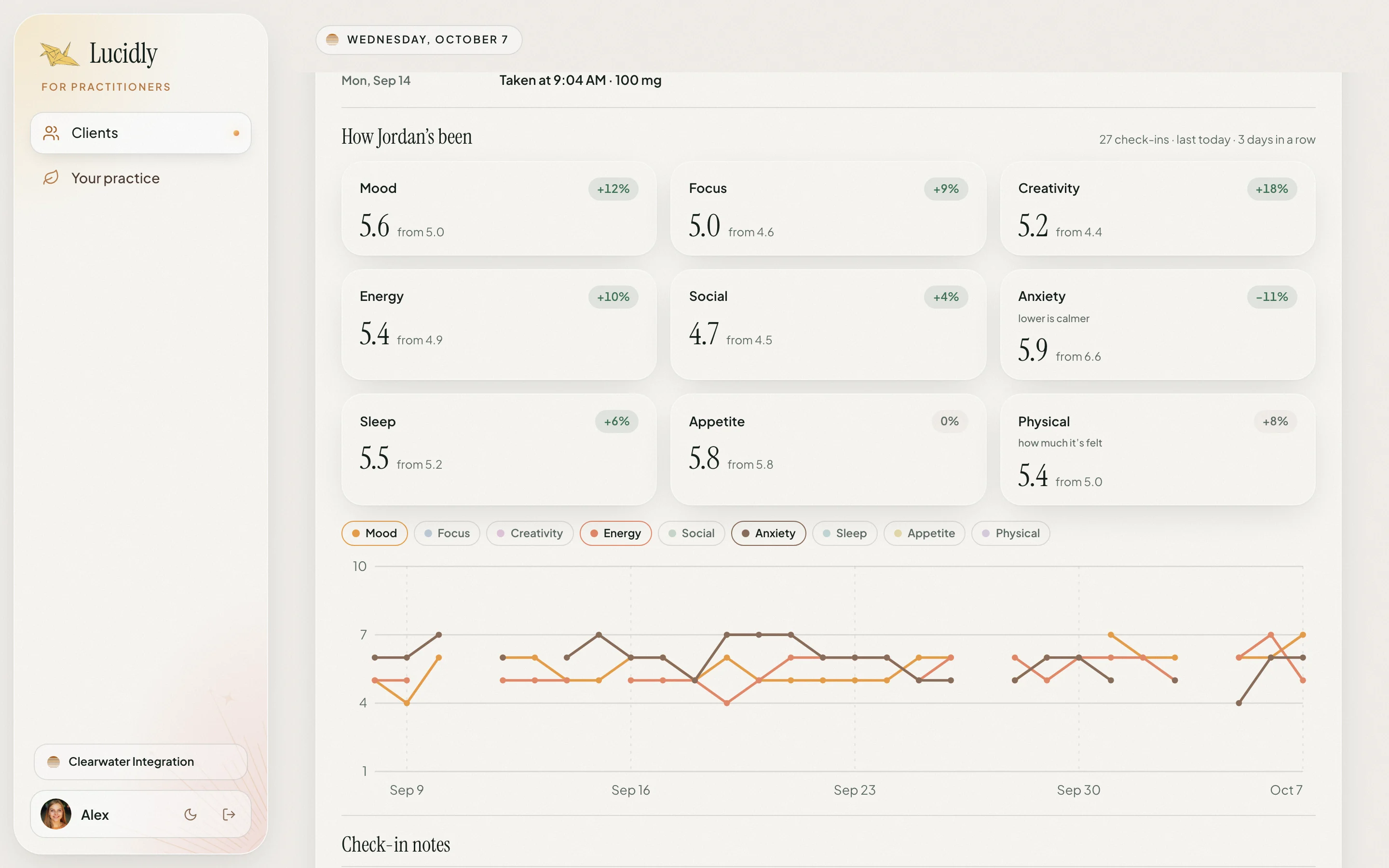
A client's check-ins on a practitioner's page: how Jordan's been, 27 check-ins, 3 days in a row, with nine metrics each against their baseline: mood 5.6 from 5.0, focus 5.0 from 4.6, creativity 5.2 from 4.4, anxiety 5.9 from 6.6, lower is calmer
A client's check-ins on a practitioner's page: nine metrics, each with its average against the client's baseline (mood 5.6 from 5.0, creativity 5.2 from 4.4, anxiety 5.9 from 6.6, lower is calmer), and a daily chart of mood, energy and anxiety over 30 days

Check-ins

On unless they turn it off

How they've actually been, day by day, measured against where they started.

  • Every day's ratings: mood, focus, creativity, energy, social connection, anxiety, sleep, appetite and physical intensity
  • Each one's average against their own baseline, with anxiety read as lower is calmer
  • A daily chart over 2 weeks, 30, 60 or 90 days
  • How many check-ins, and how many days in a row
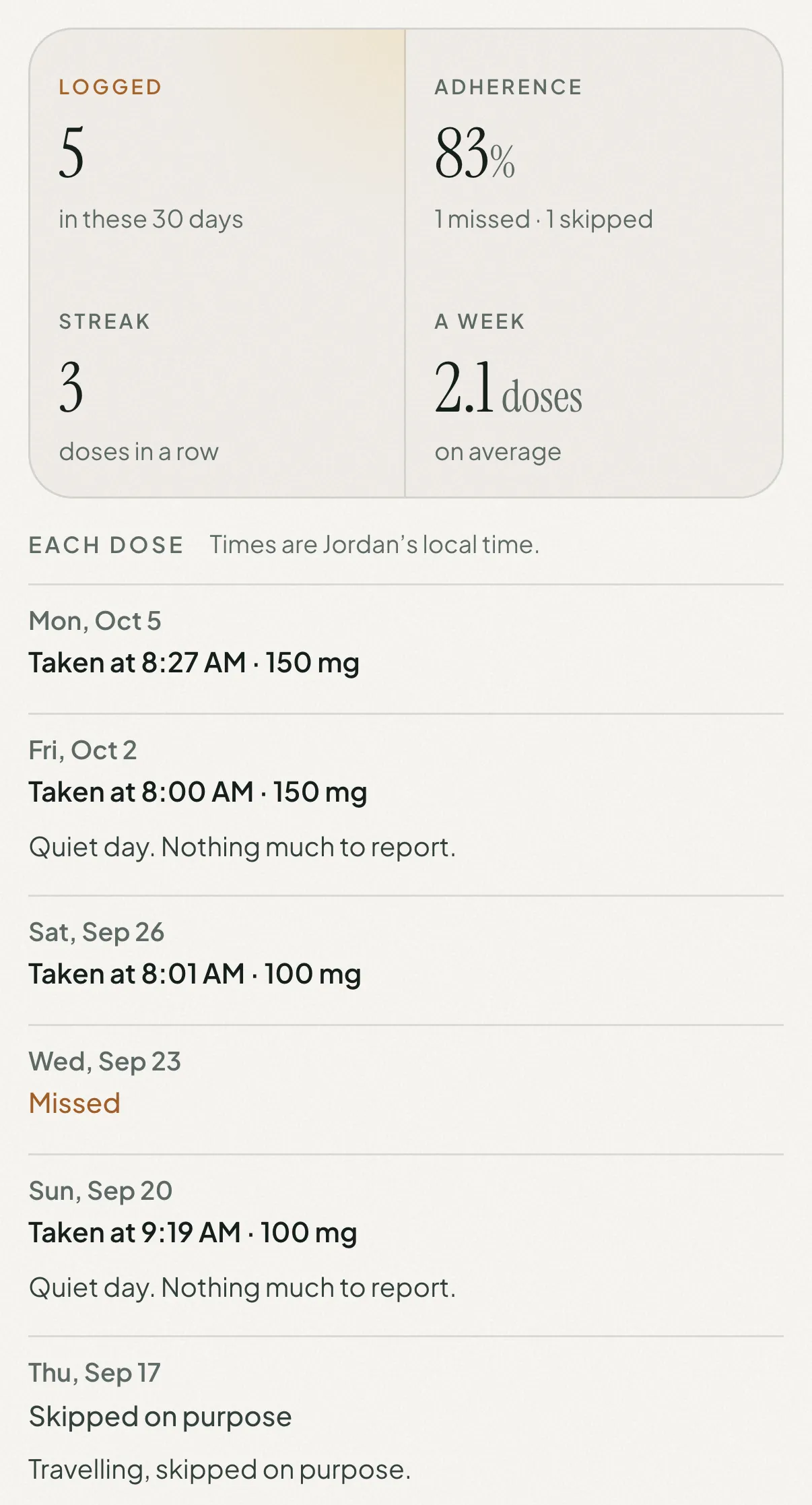
A client's doses as a practitioner sees them: 5 logged in 30 days, 83% adherence, a streak of 3, 2.1 doses a week, then each dose: taken at 8:27 AM, 150 mg; taken at 8:00 AM, 150 mg; missed; skipped on purpose

Doses

On unless they turn it off

Every dose, as it happened.

  • Each dose day: the time they took it, in their own time zone, and how much
  • Days skipped on purpose and days missed, worked out from their schedule
  • Doses logged, adherence, streak and doses a week
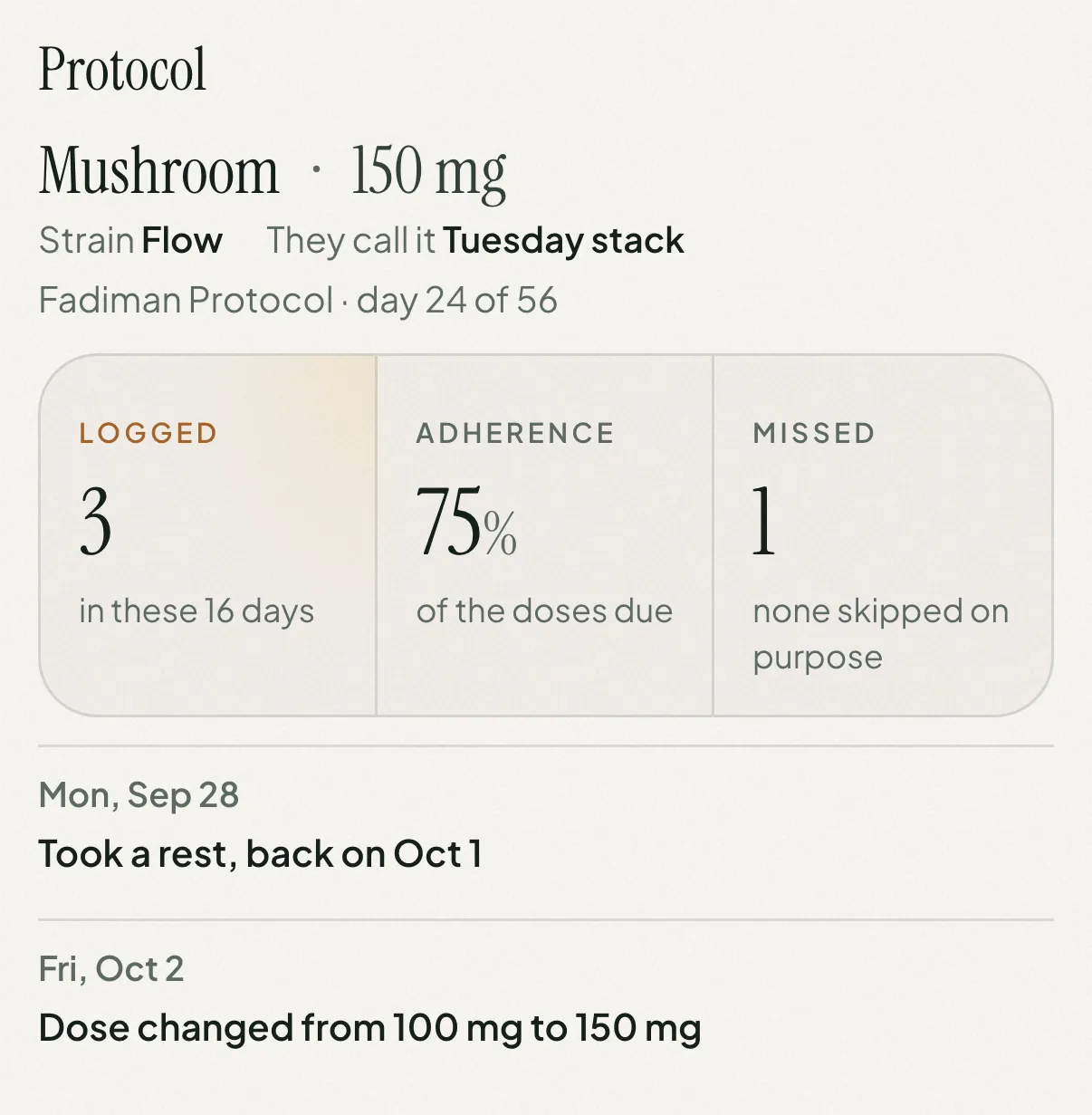
A client's protocol since their last session, as a practitioner sees it: Mushroom, 150 mg, strain Flow, which they call Tuesday stack, Fadiman Protocol day 24 of 56; 3 doses logged, 75% adherence, 1 missed; a rest from Sep 28 to Oct 1, and a dose change from 100 mg to 150 mg on Oct 2

Protocol

On unless they turn it off

What they’re taking and where they are in it.

  • Substance and strain, and their own name for the protocol
  • The dose, and every change to it
  • The rhythm (Fadiman, Stamets Stack, Intuitive or their own), the start date and which day it’s on
  • Rests, when they start and end
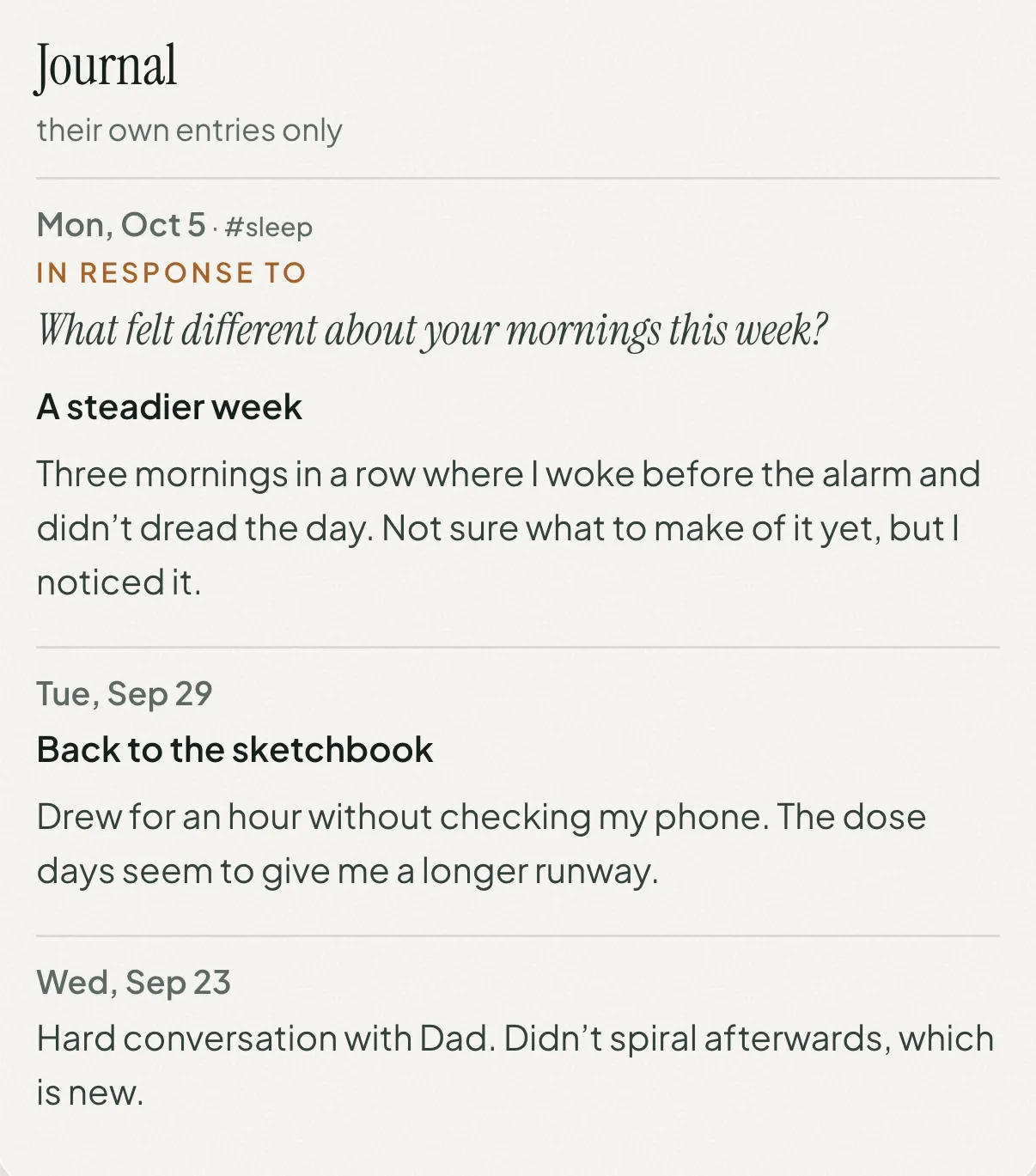
A client's journal as a practitioner sees it when entries are shared: A steadier week, written in response to the question What felt different about your mornings this week?, about waking before the alarm; Back to the sketchbook; and a short entry about a hard conversation

Journal

Off unless they choose Titles or Entries

Their own writing, as much as they want to show.

  • Titles: the dates, titles and tags of their entries
  • Entries: the entries themselves, in their own words, with the question an entry answers when it was written to one
  • Never the companion’s replies or reflections
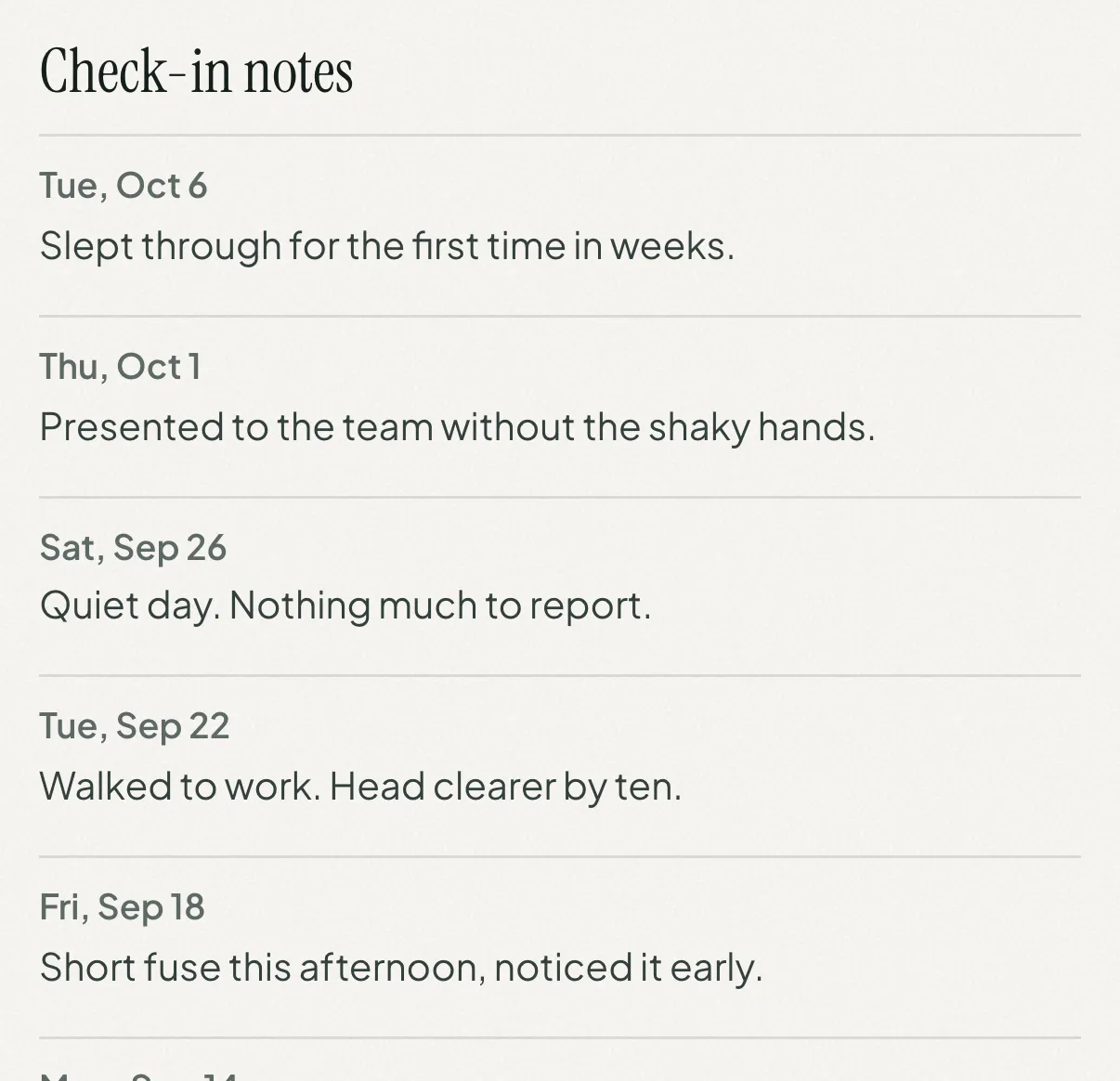
A client's check-in notes as a practitioner sees them: Slept through for the first time in weeks; Presented to the team without the shaky hands; Walked to work, head clearer by ten

Their notes

Off unless they turn it on

The line they jot beside a check-in or a dose.

  • Check-in notes, by date
  • Dose notes, shown with the dose they belong to
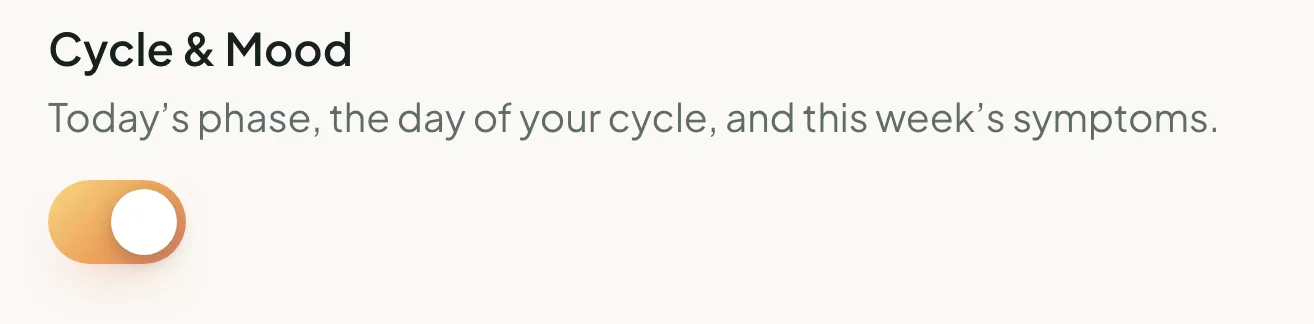
In their appThe Cycle & Mood switch in the client’s app, turned on: today’s phase, the day of your cycle, and this week’s symptomsOn your pageA client's Cycle & Mood line as a practitioner sees it: Luteal phase, day 20. This week: irritability.

Cycle & Mood

Off unless they turn it on · offered only if they track their cycle

Context for the weeks that run differently.

  • Today’s phase and the day of their cycle
  • The symptoms they’ve logged this week

What always stays private

  • Their conversations with Lucidly's companion: its replies, reflections and prompts stay in their app.
  • Their email address. You see their first name and profile photo, and you can give them a name of your own that only you see.
  • Anything they've left off. Their page simply says it isn't shared, never a nudge to ask.
  • Control of their account. You can read what they share, but you can't add, change or delete anything.
Before you meet

Walk in knowing how the weeks went.

Each client's page opens on everything since your last session. Five minutes beforehand, and the session can start where they really are.

A client's page on lucidly.you/practice, Since Sep 21: Mushroom 150 mg, strain Flow, Fadiman Protocol day 24 of 56; 3 doses logged in 16 days, 75% adherence, 1 missed; a rest from Sep 28 to Oct 1, a dose change from 100 mg to 150 mg, each dose with its time, and what moved: creativity up 1.1 and anxiety down 1.0
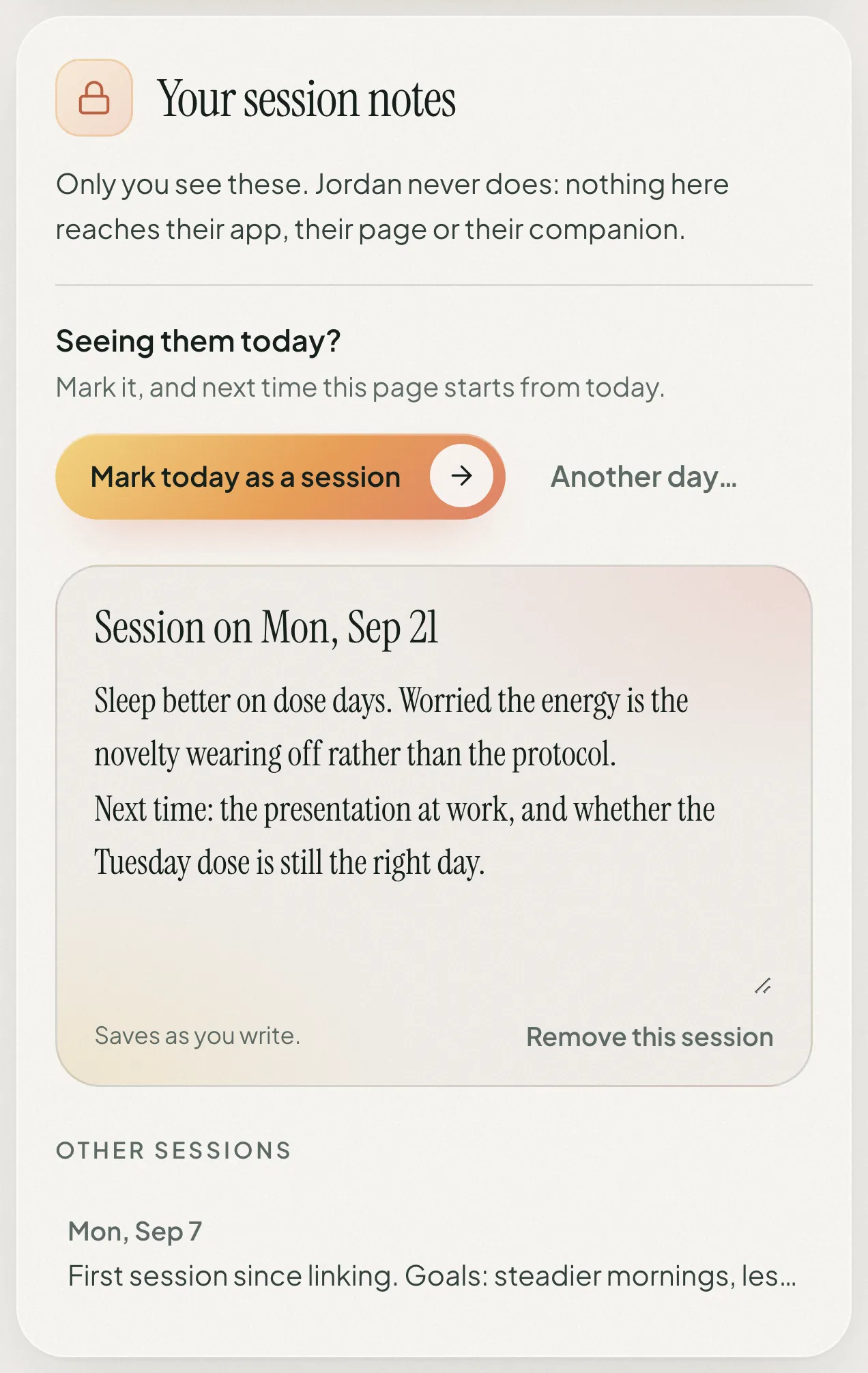
The practitioner's private session notes: Only you see these, Jordan never does. A Mark today as a session button, and notes from the session on Mon, Sep 21
  • Since your last session

    Adherence in that stretch, each dose, rests and any change of dose, and their journal if they share it: the titles, or whole entries that open in place.

  • What moved

    The metrics whose average moved by a point or more against the stretch before, so the shifts find you.

  • Notes only you see

    Private session notes that save as you type. Your client never sees them, and neither does their companion.

  • Mark the session

    One tap marks today, or any earlier day, and next time the page starts from there.

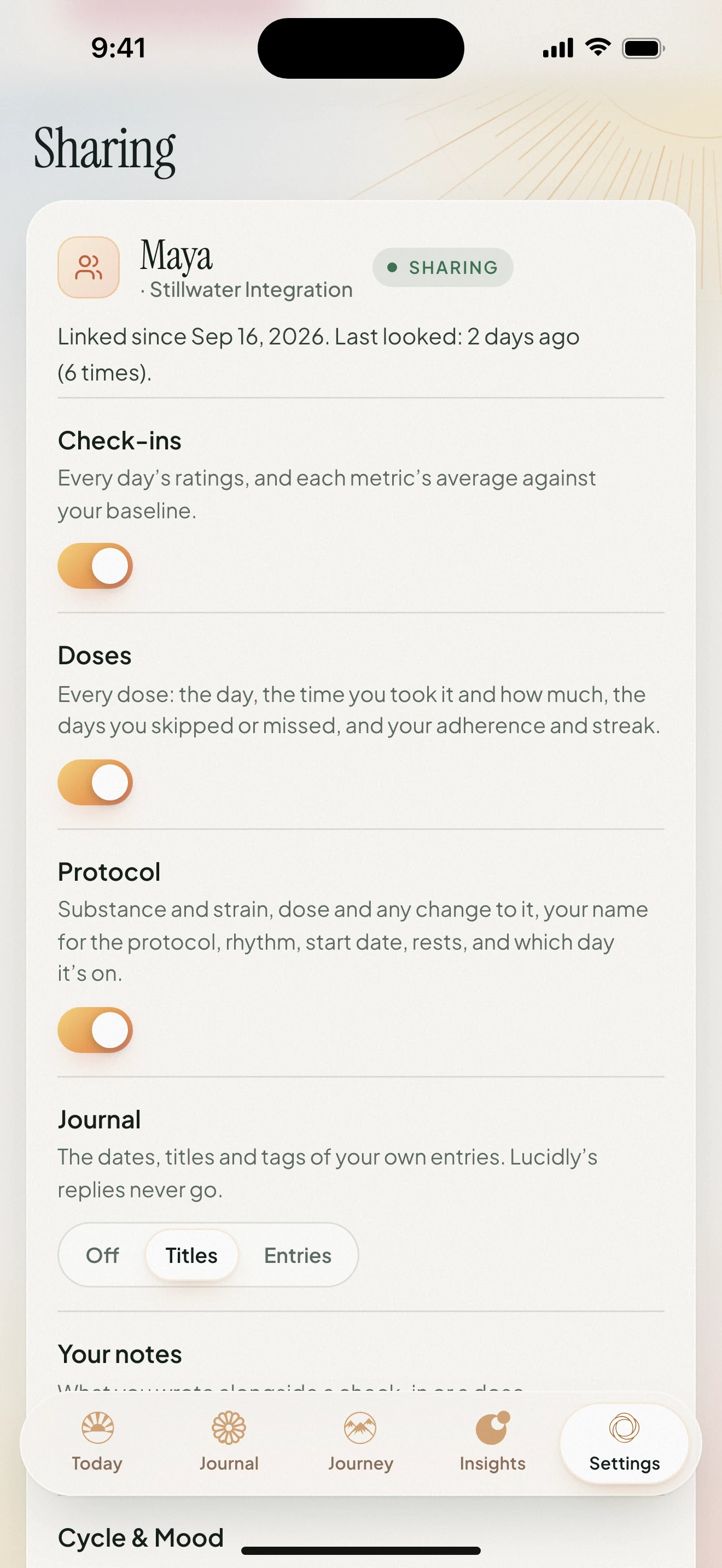
Settings → Sharing in the Lucidly app: linked to Maya of Stillwater Integration since Sep 16, last looked 2 days ago, 6 times, with switches for check-ins, doses and protocol, and journal set to titles
Their side

Your client holds the switch.

Trust is the whole point. Clients share because they stay in charge of it, and that's what makes what they share worth reading.

  • Category by category

    Each kind of information has its own switch, and they can change any of them whenever they like.

  • Pause or stop in one tap

    Pausing takes them off your list until they resume. Removing you ends the link.

  • They see what you see

    A preview in their app shows them your view of their page, exactly as you get it.

  • They know when you look

    Their app shows when you last opened their page and how many times.

What it costs

Free for you.

No seats, no card, nothing to install. Sharing is part of your client's Lucidly Premium.

For you

  • A practice at lucidly.you, free
  • Works in any browser, on your computer or your phone
  • Sign in with your email; a code arrives, no password to keep
  • Private session notes for every client

For your clients

  • Lucidly is free to download on iPhone and Android
  • Sharing with you is part of Lucidly Premium
  • Every new account starts with 14 days of Premium, free
  • Not on Premium? They can still link, and their page opens once they are
PriyaLinked · paused until Priya is on Premium
Questions

Questions practitioners ask.

Something else? Email me at ethan@lucidlyseen.com. I built Lucidly, and I'm a certified microdosing coach myself.

Do I need to download anything?

No. Your practice lives at lucidly.you/practice and works in any browser, on a computer or a phone. Sign in with your email: a code arrives, and there’s no password to keep.

What do my clients need?

The Lucidly app on iPhone or Android. They open your invite link, or type your code into Settings → Sharing, and choose what you see. Sharing is part of Lucidly Premium, and every new account starts with 14 days of Premium free.

Can I read their conversations with the companion?

No. Lucidly’s replies and reflections never leave your client’s app. If they share their journal, you see their own entries (or only the titles, if they choose), and with an entry written to a question, the question it answers. Never the companion’s side of a conversation.

Can I change anything in their account?

No. Your view is read only. The only things you write are your own: the name you give a client on your list, the sessions you mark and your private notes.

Will my client know when I look?

Yes. Their app shows when you last opened their page and how many times, and they can preview exactly what you see.

What happens if a client pauses or stops sharing?

If they pause, they leave your client list until they resume. If they remove you, the link ends and nothing of theirs stays with you. Your session notes are kept, and they come back if that client links with you again. You can also remove a client yourself; the link ends the same way, and they see that you ended it.

Is it covered by HIPAA?

No. Lucidly is a self-tracking app, not a medical records system, and it isn’t covered by HIPAA. Sharing is still handled as sensitive: your client chooses every category, everything travels encrypted, and you see their first name and profile photo, never their email address. The privacy policy covers sharing with a practitioner in full.

My client would rather not link. Is there another way?

Yes. They can save a report from Insights in the app as a PDF and send it to you before a session: how each metric has moved from their baseline, their protocols and the patterns Lucidly noticed. Reports are part of Premium too.

Does Lucidly find clients for me?

No. Lucidly doesn’t connect people with practitioners. You invite the clients you already work with, and nothing is shared until they accept.

I use Lucidly myself. Can I use the same account?

Yes. Sign in at lucidly.you/practice with the email you already use and start a practice. Your own tracking stays exactly as it is, and stays private.

Lucidly · for practitioners

Bring Lucidly into your practice.

Free for practitioners, and ready in a minute. Then send your first invite.

Open your practice(opens in a new tab)

Your clients get Lucidly here

Download Lucidly on the App StoreGet Lucidly on Google Play